

Starlink installation for fleets of work trucks and vans, nationwide. $650 per vehicle at 3+, extra discounts at 12+. Insured techs in all 50 states.
Starlink installation for fleets of work trucks and vans is priced at $650 per vehicle from three vehicles up, and fleets of twelve or more vehicles qualify for an extra discount. Nationwide Installation Techs covers all 50 states with professional, insured technicians, one point of contact, and the same mount specification on every vehicle regardless of which state it is in. We come to your yard. Most operators come to this having tried the alternative.
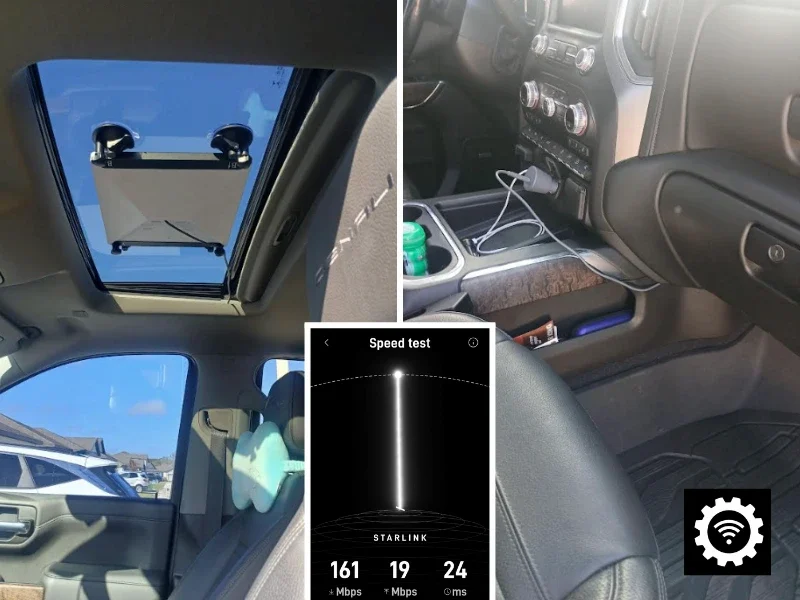
Sourcing installers market by market means a different contractor in every state, a different idea of what a good mount looks like, and nobody to call when a roof leaks in month four. The reason fleets consolidate onto one vendor is not price. It is that the twentieth van comes back looking exactly like the first. This page is about putting satellite internet on work trucks and vans specifically: where the dish mounts on each body type, how to do it without drilling a leased vehicle, where the router lives, how it is wired so it does not flatten a battery, and whether your crews need connectivity while moving or only while parked.
Mounting on Work Trucks, Vans and Box Trucks
The mount is where fleet installs differ most from a house, because the roof is already busy and the vehicle moves.
On a cargo or service van, a low-profile roof mount bolted through into structure is the usual answer, clear of ladder racks, roof vents and any existing beacon. The cable comes down through a sealed grommet rather than a door seal, which is the shortcut that produces a leak and a wind whistle at sixty miles an hour.
On a pickup with a service body, a headache-rack or bed-rail mount often beats the cab roof. It keeps the roofline clear, puts the dish where a technician can reach it without climbing on paint, and moves the penetration off the cab.
On a box truck, the front roof section is normally the cleanest cable run and the least obstructed sky.
If the vehicles are leased or have to go back unmodified, say so before install day. A rail clamp on an existing roof rack, a bed-rail clamp, or a magnetic mount on a steel cab roof all avoid a penetration entirely. The honest trade-off is that a magnetic mount is a parked-use solution, not something to rely on at sustained highway speed, so a leased fleet needing in-motion connectivity usually clamps to rack structure instead.
Where we do penetrate, the hole gets sealed properly. A roof opening in a van that lives outdoors year-round will be found by the first hard rain rather than at handover.
In Motion or Parked: They Are Not the Same Install
Settle this before anything is ordered, because it changes the hardware, the plan and the mount.
Parked use covers most fleets. The crew arrives, the van sits, and the dish covers the site for the working day. A standard dish with a stationary-rated mount handles this and is the cheaper specification by a wide margin.
In-motion use needs a dish rated for movement. The Starlink Mini is officially supported in motion on Roam and draws about 30 watts, which makes it the practical choice for a lot of work trucks. The Performance Kit and the older Flat High Performance are also motion-rated and suit vehicles needing more throughput, at a much higher draw. The standard Gen 3 dish on a Residential plan is not officially supported in motion.
Two plan facts catch fleet managers out. Mobile Priority no longer exists: Starlink restructured its business lineup in 2025 into Local Priority for domestic use and Global Priority for international and oceanic use, and existing accounts were moved across rather than grandfathered, so any quote still naming Mobile Priority is out of date. And in March 2026 the in-motion speed cap dropped to 100 mph, down from 450, on Roam and Local Priority. Far above road speed, but it comes up.
Fleets that guess at this usually guess in the expensive direction, and it is the first question our expert technicians ask.
Power, Wiring and the Battery Problem
A standard dish and router together draw roughly 50 to 75 watts in steady use, around 65 on average, and more in cold weather when the snow-melt heater runs. A Mini draws about 30. Modest with the engine running, serious with it off.
Wired straight to the starting battery and left on, a Starlink will flatten a work truck overnight. Fleet installs are normally wired through the ignition, or to an auxiliary battery with a low-voltage cutoff, so the system runs while the crew works and the vehicle still starts in the morning.
Vehicle power is also dirtier than a house. Cranking pulls system voltage down and charging pushes it back up, so a work truck swings roughly between 11 and 15 volts every time it starts. Anything wired in gets a fused circuit sized to the run and protection against those transients. Getting this wrong shows up as random reboots that look like a satellite problem and are not.
Where the Router Goes in a Van Versus a Pickup
The dish gets the attention, but router placement is what crews actually notice.
A cargo or service van usually has room on a bulkhead or inside a shelving unit, high and dry, with the cable kept out of the load area where a ladder will catch it. Vans are the easy case, and that space is why they take a multi-device setup comfortably.
In a pickup, the cab is the only sheltered spot, so the router goes under or behind a seat and the run from a headache-rack mount stays short. A service body box is not a router location: it is not sealed, and it gets wet. Box trucks take the router in the cab rather than the cargo box for the same reason.
Where several crew devices share the connection, or cellular has to stay in as backup, the vehicle can run a dual-WAN router so it fails over instead of dropping. Say so up front, because it changes the parts list rather than the labor.
What Starlink Installation for Fleets Costs
Pricing is confirmed in writing before anything is scheduled and does not change on the day.
- $750 per site or vehicle as the standard commercial rate
- $650 per vehicle at three or more vehicles
- Extra discounts at twelve or more vehicles
- Virtual survey free; on-site survey $75 where a vehicle or yard needs assessing first
Fleet work is priced within our commercial Starlink installation service, which also covers fixed sites, yards and multi-site rollouts. Full detail by service type is in our Starlink installation cost guide.
Before and after a rollout it is worth benchmarking with a Speedtest.net check at a representative site, so you have a real number from the territory rather than a brochure figure.
Scheduling a Fleet Without Taking It Off the Road
Fleets do not stop, which is the practical constraint on this work.
We work through a yard across one or more days, taking vehicles as they come available rather than needing the whole fleet at once, and scheduling between shifts where operators run shift patterns. Fleets spread across several depots or states run as a single project with one point of contact and a shared schedule. Common for construction and civil crews, utility and line crews, field service fleets, agriculture and forestry, pipeline and mining access roads, and emergency response units.
Where a fleet also runs fixed yards or depots, those buildings can be linked with a point-to-point wireless bridge rather than trenching or renting a second circuit. Every vehicle is documented on completion, which matters when the person approving the invoice is not the person who watched the work.
When Cellular Is the Better Answer
Worth saying plainly, because it is true for a lot of fleets.
If your crews work metro areas with solid carrier coverage, a good cellular router is cheaper, simpler and entirely sufficient. We would rather tell you that than sell you twelve satellite installs you do not need.
Satellite internet earns its place where cellular is not reliably there, and plenty of fleets run both: cellular as primary, Starlink for the regions where cellular runs out. That combination is usually right for a mixed territory, and it is worth specifying deliberately rather than discovering the gap on a job.
What We Do Not Do
Knowing where a company stops is as useful as knowing what it sells:
- We are an installer, not a Starlink dealer or an authorized retailer. Supply your own kits and book the labor, or take an install-and-kit bundle if sourcing both together is easier.
- Your Starlink account and service plans stay yours. We do not bill them or manage plan changes, including moving vehicles between mobile and fixed plans.
- We have no affiliation with Starlink or SpaceX and do not represent them.
- We do not fabricate custom vehicle racks or perform structural modification to a vehicle body. We mount to existing structure and rack systems.
- We do not install or service telematics, dash cameras or vehicle electronics beyond the connectivity itself.
Frequently Asked Questions
Fleet installation is $650 per vehicle at three or more vehicles, down from the $750 single-site rate. Fleets of twelve or more vehicles qualify for an extra discount. Pricing is confirmed in writing before any work is scheduled, and it does not change on the day. Our Starlink installation cost guide sets out the full breakdown by service type.
Yes, with hardware and a plan rated for it. The Starlink Mini is officially supported for in-motion use on Roam and draws about 30 watts, which makes it the practical choice for many work trucks. The Performance Kit and the older Flat High Performance are also motion-rated for vehicles needing more throughput, at a much higher draw. The standard Gen 3 dish on a Residential plan is not officially supported in motion. Since March 2026 the in-motion cap has been 100 mph, down from 450, which is far above road speed. A standard dish is fine at a job site with the vehicle parked, which is enough for a lot of fleets, but it is not the same specification.
It depends on the body and on whether crews need roof access. On a cargo or service van, a low-profile roof mount bolted through into structure is usual, clear of ladder racks and roof vents. On a pickup with a service body, a headache-rack or bed-rail mount often works better and keeps the cab roof clear. On box trucks the front roof section is normally the cleanest cable run. Every penetration is sealed properly, because a roof opening on a van that lives outdoors is a leak waiting to happen if it is done casually.
Yes. A rail clamp on an existing roof rack, a bed-rail clamp, or a magnetic mount on a steel cab roof all avoid a penetration, which matters when vehicles have to go back to the lessor unmodified. The trade-off is that a magnetic mount is a parked-use solution rather than something to rely on at sustained highway speed, so a leased fleet needing in-motion connectivity usually clamps to rack structure instead. Tell us the vehicles are leased before install day and the mount is specified around it.
It will if it is wired straight to the battery and left on with the engine off, because a standard dish and router together draw roughly 50 to 75 watts, and more in cold weather when the snow-melt heater runs. Fleet installs are normally wired through the ignition or to an auxiliary battery with a low-voltage cutoff, so the system runs while the crew works and does not strand the vehicle overnight. Vehicle voltage also swings roughly between 11 and 15 volts through cranking and charging, so the circuit is fused and protected against those transients.
On a bulkhead or inside a shelving unit, high and dry, with the cable kept out of the load area where a ladder will catch it. Vans have the space to do this properly. In a pickup the cab is the only sheltered option, so the router goes under or behind a seat; a service body box is not a router location because it is not sealed. Box trucks normally take the router in the cab rather than the cargo box. Where several crew devices share the connection or cellular has to stay in as backup, the vehicle can be set up on a dual-WAN router so it fails over instead of dropping.
We come to the vehicles, and yes. For a single yard that usually means working through it over one or more days, or scheduling between shifts so vehicles are done as they come available. Nationwide Installation Techs covers all 50 states, so a fleet spread across several depots runs as one project with a single point of contact and a shared schedule. Every vehicle gets the same mount specification, cable routing and configuration regardless of state, and each install is documented on completion.
Not always, and it is worth being straight about that. In a metro area with solid carrier coverage a good cellular router is cheaper and simpler, and plenty of fleets should just use one. Satellite internet earns its place where crews work beyond reliable cellular: rural utility corridors, construction sites before service reaches them, agricultural ground, forestry, pipeline and mining access roads, disaster response, and anywhere a dead zone costs a crew a day. Many fleets run both, with cellular primary and Starlink for the sites where cellular is not there.
About Nationwide Installation Techs
Nationwide Installation Techs runs a nationwide network of professional Starlink installers, providing Starlink installation services through experienced, insured technicians in all 50 states. The company installs Starlink for residential, commercial, mobile/RV, marine, and multi-unit customers, and also provides Wi-Fi extenders, point-to-point wireless bridges, mesh network setup, and Starlink-to-fiber integration. More than 3,000 installations completed, at least $1 million in liability insurance, background-checked technicians, and a one-year workmanship warranty plus three months of technical support. The company maintains a 5.0-star Google rating from 80+ reviews. If you are looking for a fleet Starlink installer near you, see the full locations we serve or call (877) 309-1050 to discuss a fleet.
Contact Information
Nationwide Installation Techs LLC
- Phone: (877) 309-1050
- Email: support@techinstalls.io
- Free Quote: Contact Us Form
Connectivity News & Updates

Starlink Installation for Construction Sites — Local, Insured Techs
Starlink installation for construction sites, in all 50 states, from...

Thor Four Winds Starlink Installation | We Come To You
Thor Four Winds Starlink installation means working around a domed...

Residential Starlink Installation — Nationwide and Insured
Residential Starlink installation starting at $385, nationwide. Nationwide Installation Techs...

Expert Starlink Installation for Yachts and Boats
Starlink installation for yachts and boats, nationwide. Nationwide Installation Techs...
Disclaimer: Nationwide Installation Techs LLC is an independent business and has no affiliation or official connection with Starlink, SpaceX, or any of their subsidiaries or affiliates. We are not associated with, authorized, endorsed, or sponsored by these companies in any capacity. For official information, please visit the Starlink and SpaceX websites at www.starlink.com and www.spacex.com. The names Starlink, SpaceX, and any related trademarks, logos, or imagery are the exclusive property of their respective owners.
Any references to certified or certification on this website refer exclusively to Nationwide Installation Techs LLC proprietary in-house technician certification program. This training and certification process was developed by our company based on the experience and installation methods of professional technicians who have collectively completed more than 3,000 successful Starlink installations while maintaining an overall 5.0-star customer review rating. It is not affiliated with, issued by, approved by, or endorsed by Starlink, SpaceX, or any of their affiliates.